Contents · 16 sections↓
- 01How do you make audit-grade agent traces without storing prompt content?
- 02What should an AI agent audit record contain?
- 03How content-free audit trails work
- 04When you need this (and when not)
- 05What you need
- 06Step 1: Build the per-tenant audit trail
- 07Step 2: Put it on the document extraction server
- 08Step 3: Run the agent with content capture off
- 09Step 4: Read what the trail kept
- 10Step 5: Verify, check a claim, and tamper with a copy
- 11Where content leaks back in
- 12Running a content-free audit trail in production
- 13Common problems and fixes
- 14Limitations
- 15FAQ
- 16Next steps
Audit-grade agent traces without storing prompt content are possible: record who acted, which tool ran, what was decided and how it ended, and keep arguments and results only as keyed digests. This guide explains what to record, how hash chains make the trail tamper-evident, how to keep each tenant's trail separate and verifiable by that tenant, and how to build it for an AI document extraction agent with Promptise Foundry, with real runs and a tamper check.
How do you make audit-grade agent traces without storing prompt content?
Record the facts of each action, not its content. For every tool call, write who called (user, tenant, roles), which tool, the outcome (ok, denied, failed) and a request id, and chain the entries with an HMAC so any edit, deletion or reordering shows up. Keep arguments and results out of the record, except identifiers you need in clear; store the rest as keyed digests (HMAC), so you can later check a claimed value without the trail holding it. Give each tenant its own key and files, so a tenant can verify its own trail and nobody else's.
Audit at the tool boundary. The MCP server sees every action, whatever the model said. That is where the record belongs.
Digests, not hashes. A plain SHA-256 of "1,240.00 EUR" can be guessed by hashing candidates. An HMAC with a key you hold cannot.
Chain the entries. Each entry carries the previous entry's MAC, so a verifier finds edits, inserts, deletions and reordering.
One key per tenant. Derive it from a master key. The tenant can verify its files; another tenant's key fails.
Turn content off everywhere else too. Agent traces, run journals and error messages can hold the content your audit trail leaves out.
[02]
What should an AI agent audit record contain?
An audit record answers "who did what, when, and with what result" well enough that someone who wasn't there can check it. For an agent, that is one record per tool call:
Field | Example | Stored as | Why |
|---|---|---|---|
Who | dana@acme.example, tenant acme, roles clerk | Clear | Attribution: from the verified token, never from the model |
What | save_extraction | Clear | The action itself |
Which record | document_id: INV-1001 | Clear | Lets you find the affected object without its content |
Arguments | total, vendor | Keyed digest | Proves what was sent, without storing it |
Decision | ok, error with ACCESS_DENIED | Clear | A refusal is part of the record, not a gap in it |
Result | hmac:7e8e… | Keyed digest | Proves what came back |
When, how long | timestamp, duration | Clear | Ordering and timing |
Integrity | seq, prev_hash, hmac | Clear | Tamper evidence |
What stays out: the user's prompt, the model's answer, the system prompt, retrieved documents and the text a tool read. Those are the parts most likely to hold personal or confidential data, and the parts a trail rarely needs. If an investigation needs content, it should come from the system of record (the document store, the CRM) under that system's own access controls, and the digest tells you whether what you were given is what the agent saw.
Whether a particular trail meets a particular legal or contractual requirement is a question for your legal or compliance team; this guide covers the engineering.
[03]
How content-free audit trails work
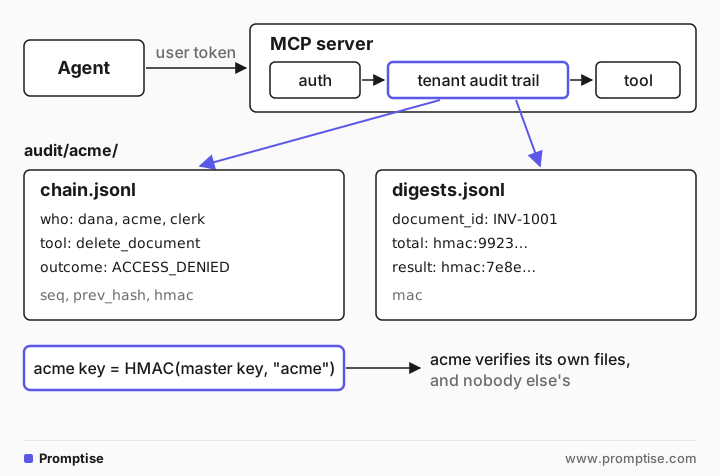
Three techniques do the work.
A hash chain for tamper evidence. Each entry stores the MAC of the entry before it (prev_hash) and its own MAC over its fields (hmac), computed with a secret key. Change a field and its MAC no longer matches. Delete an entry and the next one points at a MAC that isn't there. Reorder two and the links cross. A forger without the key can't compute valid MACs. The one thing a chain can't show alone is entries cut from the end; for that you record the last hash somewhere else (an anchor). AI Agent Audit Logging: Tamper-Evident Logs in Python walks through all six kinds of tampering, anchors, restarts and log rotation in detail; this guide uses the same chain and focuses on keeping content out.
Keyed digests instead of content. A digest is HMAC(key, canonical value). Given a candidate value, anyone with the key can recompute it and compare. Without the key, the digest reveals nothing useful, and that matters because agent arguments are often short and guessable: amounts, dates, names, yes or no. A plain hash of a guessable value is not a secret.
Per-tenant keys and files. Each tenant's records go to its own folder and are signed with its own key, derived as HMAC(master key, tenant id). You can hand a tenant its key and its files. It can then verify independently that the trail is complete and unaltered, while it can't verify, or learn anything from, another tenant's trail. Rotating the master key rotates every tenant key.
[04]
When you need this (and when not)
You need a content-free trail when:
agents act on customer data and someone outside the team may ask what happened: a customer, an auditor, an incident review;
one platform serves several tenants and each wants evidence about its own data;
the content is the sensitive part, as in document extraction, support, HR or finance workflows;
your traces leave your trust boundary, for example to a hosted observability vendor.
You may not need it for a local prototype, for agents that only read public data, or when you already keep full content in a store with stricter controls than your logs. A content-free trail also doesn't replace debugging traces: while developing, you want to see prompts. Keep that in a development environment, not in production.
[05]
What you need
Python 3.10 or newer and Promptise Foundry 1.7.0.
An OpenAI API key for the demo agent (any model with tool calling works).
Two throwaway secrets: one to sign test tokens, one master audit key.
uv venv && uv pip install "promptise==1.7.0" python-dotenv
export DOCS_JWT_SECRET=$(python -c "import secrets; print(secrets.token_hex(32))")
export AUDIT_MASTER_KEY=$(python -c "import secrets; print(secrets.token_hex(32))")[06]
Step 1: Build the per-tenant audit trail
The trail is MCP server middleware. For each tenant it keeps one Promptise AuditMiddleware (the HMAC chain, with include_args=False and include_result=False, the defaults) and writes one digest line per call next to it:
"""A content-free, per-tenant audit trail for MCP tool calls.

Each tenant gets two files under audit/<tenant>/:
  chain.jsonl    Promptise AuditMiddleware: who, which tool, outcome, HMAC chain.
                 No arguments, no results.
  digests.jsonl  One line per call: arguments and result as keyed digests,
                 except fields you allow in clear (ids). Each line is signed.
Both files are signed with the tenant's own key, derived from one master key.
"""
import hashlib
import hmac
import json
import os
from pathlib import Path
from typing import Any

from promptise.mcp.server import AuditMiddleware, RequestContext, verify_audit_log

# Argument fields that are safe to keep in clear, per tool. Everything else
# is stored as a keyed digest.
CLEAR_FIELDS = {
    "read_document": {"document_id"},
    "save_extraction": {"document_id", "due_date"},
    "delete_document": {"document_id"},
}


def tenant_key(tenant: str) -> bytes:
    """The tenant's audit key: HMAC(master key, tenant). Hand it to the tenant
    and they can verify their own trail, and nobody else's."""
    master = os.environ["AUDIT_MASTER_KEY"].encode()
    return hmac.new(master, f"audit:{tenant}".encode(), hashlib.sha256).digest()


def digest(key: bytes, value: Any) -> str:
    """Keyed digest of a value. Without the key, nobody can test guesses
    such as "was the total 1240.00?" against it."""
    canonical = json.dumps(value, sort_keys=True, default=str)
    return "hmac:" + hmac.new(key, canonical.encode(), hashlib.sha256).hexdigest()[:32]


def sign(key: bytes, record: dict) -> str:
    return hmac.new(key, json.dumps(record, sort_keys=True).encode(), hashlib.sha256).hexdigest()


class TenantAuditTrail:
    """MCP middleware: one AuditMiddleware chain and one digest file per tenant."""

    def __init__(self, root: str = "audit") -> None:
        self.root = Path(root)
        self._chains: dict[str, AuditMiddleware] = {}

    def _chain(self, tenant: str) -> AuditMiddleware:
        if tenant not in self._chains:
            folder = self.root / tenant
            folder.mkdir(parents=True, exist_ok=True)
            self._chains[tenant] = AuditMiddleware(
                log_path=str(folder / "chain.jsonl"),
                hmac_secret=tenant_key(tenant).hex(),
                include_args=False,    # the default: no argument values in the chain
                include_result=False,  # the default: no result text in the chain
            )
        return self._chains[tenant]

    async def __call__(self, ctx: RequestContext, call_next):
        tenant = (ctx.client.tenant_id if ctx.client else None) or "_no_tenant"
        outcome: dict[str, Any] = {}

        async def run_tool(c: RequestContext):
            outcome["result"] = await call_next(c)
            return outcome["result"]

        try:
            return await self._chain(tenant)(ctx, run_tool)
        finally:
            self._write_digests(tenant, ctx, outcome)

    def _write_digests(self, tenant: str, ctx: RequestContext, outcome: dict) -> None:
        key = tenant_key(tenant)
        clear = CLEAR_FIELDS.get(ctx.tool_name, set())
        args = ctx.state.get("_tool_arguments") or {}
        record = {
            "request_id": ctx.request_id,
            "tool": ctx.tool_name,
            "args": {k: (v if k in clear else digest(key, v)) for k, v in sorted(args.items())},
            "result": digest(key, outcome["result"]) if "result" in outcome else None,
        }
        record["mac"] = sign(key, record)
        with open(self.root / tenant / "digests.jsonl", "a") as f:
            f.write(json.dumps(record) + "\n")


def verify_trail(tenant: str, root: str = "audit") -> list[str]:
    """Check a tenant's chain and digest file together. Returns the problems found."""
    folder = Path(root) / tenant
    key = tenant_key(tenant)
    report = verify_audit_log(str(folder / "chain.jsonl"), key.hex())
    problems = [str(p) for p in report.problems]

    chain_ids = [json.loads(line)["request_id"] for line in open(folder / "chain.jsonl") if line.strip()]
    digest_ids = []
    for n, line in enumerate(open(folder / "digests.jsonl"), start=1):
        record = json.loads(line)
        mac = record.pop("mac", "")
        if not hmac.compare_digest(sign(key, record), mac):
            problems.append(f"digests.jsonl:{n}: signature does not match (edited or forged)")
        digest_ids.append(record["request_id"])
    for rid in sorted(set(chain_ids) - set(digest_ids)):
        problems.append(f"request {rid}: in the chain but its digest line is missing")
    for rid in sorted(set(digest_ids) - set(chain_ids)):
        problems.append(f"request {rid}: digest line with no chain entry")
    return problems
What each part does:
`tenant_key()` derives the tenant's key from the master key. The master key never leaves your secret store; a tenant gets only its own derived key.
`AuditMiddleware` writes the chain: timestamp, tool, client id, request id, status, duration, the error and error_code on failure, and an identity block with the verified subject, tenant and roles. It never writes the token or the full claim set. With include_args=False and include_result=False it writes no argument values and no result text.
`CLEAR_FIELDS` is the policy: which arguments stay readable. Ids and dates you need to find records; everything else becomes hmac:…. A field you forget to list is digested, so the safe failure is "not readable", not "stored in clear".
`_write_digests()` reads the validated arguments the server hands middleware (ctx.state["_tool_arguments"]), digests them and the result, and signs the whole line, so a digest can't be swapped for another.
`verify_trail()` checks both files: the chain with Promptise's verify_audit_log, each digest line's signature, and that the chain and the digests list the same request ids. The chain makes the set of calls tamper-evident; the request-id cross-check extends that to the digest file.
[07]
Step 2: Put it on the document extraction server
The example is an AI document extraction audit trail. Two companies, Acme and Globex, share one extraction service. Its tools read an invoice, save the extracted fields and, for admins, delete a document:
"""Document extraction tools for two tenants, with a content-free audit trail."""
import os

from promptise.mcp.server import (
    AuthMiddleware,
    HasRole,
    JWTAuth,
    MCPServer,
    RequestContext,
    ToolError,
)
from trail import TenantAuditTrail

server = MCPServer("docs", require_tenant=True)
server.add_middleware(AuthMiddleware(JWTAuth(secret=os.environ["DOCS_JWT_SECRET"]), tenant_claim="org"))
server.add_middleware(TenantAuditTrail("audit"))  # after auth: it knows who is calling

DOCUMENTS = {
    "acme": {
        "INV-1001": "Invoice INV-1001 from Northwind Supplies, contact Jane Doe "
                    "(jane.doe@northwind.example). Total due: 1,240.00 EUR. Due date: 2026-11-15.",
    },
    "globex": {
        "INV-2001": "Invoice INV-2001 from Contoso Freight, contact Raj Patel "
                    "(raj@contoso.example). Total due: 18,900.00 USD. Due date: 2026-12-01.",
    },
}
EXTRACTIONS: dict[tuple[str, str], dict] = {}


def tenant_docs(ctx: RequestContext) -> dict:
    return DOCUMENTS.get(ctx.client.tenant_id, {})


@server.tool(read_only_hint=True)
async def read_document(document_id: str, ctx: RequestContext) -> str:
    """Return the text of one of your organisation's documents."""
    text = tenant_docs(ctx).get(document_id)
    if text is None:
        raise ToolError(f"No document {document_id} in your organisation.")
    return text


@server.tool()
async def save_extraction(document_id: str, vendor: str, total: str, due_date: str,
                          ctx: RequestContext) -> dict:
    """Save the fields extracted from a document."""
    if document_id not in tenant_docs(ctx):
        raise ToolError(f"No document {document_id} in your organisation.")
    record = {"vendor": vendor, "total": total, "due_date": due_date}
    EXTRACTIONS[(ctx.client.tenant_id, document_id)] = record
    return {"saved": document_id, **record}


@server.tool(destructive_hint=True, guards=[HasRole("admin")])
async def delete_document(document_id: str, ctx: RequestContext) -> dict:
    """Delete a document. Admins only."""
    tenant_docs(ctx).pop(document_id, None)
    return {"deleted": document_id}


if __name__ == "__main__":
    server.run(transport="http", host="127.0.0.1", port=8781)
The order of middleware matters: AuthMiddleware runs first, so the trail always knows who called and for which tenant (tenant_claim="org" reads the tenant from the token's org claim). require_tenant=True refuses any call whose token names no tenant. The tools filter by ctx.client.tenant_id, so a model asking for another tenant's invoice gets "No document" rather than the document. Multi-Tenant AI Agents: Keep Each Customer's Data Apart explains that server pattern step by step.
[08]
Step 3: Run the agent with content capture off
The agent side has its own trace. By default a Promptise agent's observability records tool arguments and result previews (redacted for credentials and common PII), and at the FULL level also prompt and answer text. For a content-free trace, turn both off:
"""Two tenants use one extraction agent. The trace keeps no prompt or document text."""
import asyncio
import json
import os
import socket
import shutil
import subprocess
import sys
import time

from dotenv import load_dotenv

from promptise import CallerContext, ObservabilityConfig, ObserveLevel, build_agent
from promptise.config import HTTPServerSpec
from promptise.mcp.server import JWTAuth

load_dotenv()  # OPENAI_API_KEY
URL = "http://127.0.0.1:8781/mcp"
issuer = JWTAuth(secret=os.environ["DOCS_JWT_SECRET"])  # stands in for your identity provider


def sign_in(user: str, org: str, roles: list[str]) -> CallerContext:
    token = issuer.create_token({"sub": user, "org": org, "roles": roles})
    return CallerContext(user_id=user, tenant_id=org, bearer_token=token)


def start_server() -> subprocess.Popen:
    shutil.rmtree("audit", ignore_errors=True)
    proc = subprocess.Popen([sys.executable, "docs_server.py"], stdout=subprocess.DEVNULL,
                            stderr=subprocess.DEVNULL)
    for _ in range(50):
        try:
            socket.create_connection(("127.0.0.1", 8781), timeout=1).close()
            break
        except Exception:
            time.sleep(0.2)
    return proc


async def main() -> None:
    server = start_server()
    agent = await build_agent(
        model="openai:gpt-5-mini",
        servers={"docs": HTTPServerSpec(url=URL, bearer_token=issuer.create_token({"sub": "extractor"}))},
        instructions="You process invoices. To extract one, read it, then save vendor, total "
                     "(amount and currency) and due_date (YYYY-MM-DD). For other requests, use the "
                     "matching tool. Reply in one short sentence.",
        observe=ObservabilityConfig(
            level=ObserveLevel.STANDARD,
            record_prompts=False,   # no prompt or answer text in the trace
            record_tool_io=False,   # no tool arguments or results, only their lengths
            redact_sensitive=True,  # the default: credentials and common PII scrubbed anyway
        ),
    )
    dana = sign_in("dana@acme.example", "acme", ["clerk"])
    li = sign_in("li@globex.example", "globex", ["clerk"])
    try:
        for caller, question in [
            (dana, "Extract INV-1001."),
            (li, "Extract INV-2001."),
            (dana, "Delete document INV-1001."),
        ]:
            result = await agent.ainvoke({"messages": [{"role": "user", "content": question}]}, caller=caller)
            print(f"{caller.tenant_id}: {question}\n  -> {result['messages'][-1].content}")

        print("\nTrace events (tool calls):")
        for entry in agent.collector.get_timeline():
            kind = getattr(entry.event_type, "value", entry.event_type)
            if kind in ("tool.call", "tool.result", "tool.error"):
                meta = {k: v for k, v in entry.metadata.items()
                        if k in ("tool_name", "arguments_length", "result_length", "arguments", "result")}
                print(f"  {kind:<11} {json.dumps(meta)}")
    finally:
        await agent.shutdown()
        server.terminate()


asyncio.run(main())
One agent serves both tenants. Each request carries a CallerContext with the user's token, which the agent sends to the MCP server on every tool call, so the server attributes each call to Dana at Acme or Li at Globex. The run:
acme: Extract INV-1001.
  -> Extracted and saved: vendor "Northwind Supplies", total "1,240.00 EUR", due_date "2026-11-15".
globex: Extract INV-2001.
  -> Saved extraction for INV-2001: vendor=Contoso Freight, total=18,900.00 USD, due_date=2026-12-01.
acme: Delete document INV-1001.
  -> I can't delete INV-1001 because I lack the required admin role; please ask an admin to delete it or grant the admin role.

Trace events (tool calls):
  tool.call   {"tool_name": "read_document", "arguments_length": 27}
  tool.result {"result_length": 135, "tool_name": "read_document"}
  tool.call   {"tool_name": "save_extraction", "arguments_length": 110}
  tool.result {"result_length": 104, "tool_name": "save_extraction"}
  tool.call   {"tool_name": "read_document", "arguments_length": 27}
  tool.result {"result_length": 127, "tool_name": "read_document"}
  tool.call   {"tool_name": "save_extraction", "arguments_length": 108}
  tool.result {"result_length": 102, "tool_name": "save_extraction"}
  tool.call   {"tool_name": "delete_document", "arguments_length": 27}
  tool.error  {"tool_name": "delete_document"}
Dana's extraction and Li's extraction ran. Dana's delete was refused by the HasRole("admin") guard. The agent's trace kept the tool names and the lengths of arguments and results, nothing else: no invoice text, no extracted values, no prompt.
[09]
Step 4: Read what the trail kept
Here are two of Acme's chain entries, the extraction and the refused delete:
{"timestamp": 1792740226.2760189, "tool": "save_extraction", "client_id": "dana@acme.example", "request_id": "01de0a84f73d", "status": "ok", "duration_s": 0.0001, "identity": {"subject": "dana@acme.example", "tenant_id": "acme", "roles": ["clerk"]}, "seq": 1, "prev_hash": "9550ccf44ba62dd9402a6b9253cf2bfc91a194a7896176bb36738e3ce05f0325", "hmac": "97f08271a812dffa1d5a347a018a34a39d098867877b925cac9bbe971b56bfab"}
{"timestamp": 1792740231.93259, "tool": "delete_document", "client_id": "dana@acme.example", "request_id": "30014211932a", "status": "error", "duration_s": 0.0001, "error": "AuthenticationError: Requires any of roles [admin], but client has [clerk]", "error_code": "ACCESS_DENIED", "identity": {"subject": "dana@acme.example", "tenant_id": "acme", "roles": ["clerk"]}, "seq": 2, "prev_hash": "97f08271a812dffa1d5a347a018a34a39d098867877b925cac9bbe971b56bfab", "hmac": "f042ef27ddea2db53a129ad5f9cd6ba3e1d8ec5cea0a258246e1271440422c12"}
And the matching digest lines:
{"request_id": "01de0a84f73d", "tool": "save_extraction", "args": {"document_id": "INV-1001", "due_date": "2026-11-15", "total": "hmac:762efd7610f1345145836a58d47a44b1", "vendor": "hmac:05f3ddd77bd43b64687e3486a9a6e20b"}, "result": "hmac:ad2915b3fe953a806a09eaa6ad9b21aa", "mac": "e7fc643821251b5c3782daa8f32b09e99de8fcc7d5fc070b559b2ae59d9c3bff"}
{"request_id": "30014211932a", "tool": "delete_document", "args": {"document_id": "INV-1001"}, "result": null, "mac": "b540d70c447ac7eac718e2f9eee1d02d801bcf964d9751cc426cda8149b44507"}
Together they say: Dana, a clerk at Acme, saved an extraction for INV-1001 due on 2026-11-15, then tried to delete INV-1001 and was refused for lacking the admin role. They don't say who the vendor was or how much the invoice was for, and the chain holds no document text. Notice that the refusal is a full entry with error_code: ACCESS_DENIED. A trail that only records successes can't show that a control worked.
[10]
Step 5: Verify, check a claim, and tamper with a copy
The verification script checks both tenants, runs the same check with the promptise audit verify CLI, tests candidate values against a stored digest, and then edits copies of Acme's trail:
1. Verify both tenants
  acme: intact
  globex: intact

2. The same check with the CLI, as the tenant would run it with their key
  OK 3 entries: intact.
last_hash f042ef27ddea2db53a129ad5f9cd6ba3e1d8ec5cea0a258246e1271440422c12 (seq 2) (exit 0)

3. Which total did the agent save? Test candidate values against the digest
  stored digest: hmac:762efd7610f1345145836a58d47a44b1
  '1,240.00 EUR'  match
  '1240.00 EUR'   no match
  '1240 EUR'      no match

4. Tamper with copies of acme's trail
  turn the denied delete into a success: ["audit-copy/acme/chain.jsonl:3: bad_signature: the entry's signature does not match: it was modified or forged"]
  drop the digest line of the denied delete: ['request 30014211932a: in the chain but its digest line is missing']
  swap the saved total for another digest: ['digests.jsonl:2: signature does not match (edited or forged)']

5. Acme's key does not verify Globex's chain
  ok=False: audit/globex/chain.jsonl:1: wrong_key: no entry verifies with the key given: wrong key
Part by part:
Both trails verify. Every MAC matches, every link holds, and both files list the same request ids.
The tenant can verify alone. The CLI reads the key from an environment variable (never from the command line) and exits with 0 when intact, 1 when tampered. That is what you hand a tenant: its files, its key, and this command. The last_hash it prints is the anchor to store elsewhere.
A digest answers a precise question. The saved total was exactly 1,240.00 EUR. 1240.00 EUR doesn't match, because a digest compares exact bytes. Normalize values before you digest them (amounts as integer cents, dates as ISO 8601) or every check needs the original formatting.
Tampering shows. Turning the refused delete into a success breaks that entry's signature. Dropping its digest line leaves a request in the chain with no digest. Swapping the stored total for another digest breaks that line's signature.
Keys separate tenants. Acme's key verifies none of Globex's entries.
The script's tamper helper is a few lines. It copies the trail and rewrites one file:
def tampered(name: str, edit) -> None:
    shutil.rmtree("audit-copy", ignore_errors=True)
    shutil.copytree("audit", "audit-copy")
    edit()
    print(f"  {name}: {verify_trail('acme', root='audit-copy')}")

tampered("turn the denied delete into a success", lambda: rewrite(
    "audit-copy/acme/chain.jsonl",
lambda ls: [l.replace('"status": "error"', '"status": "ok"') for l in ls]))[11]
Where content leaks back in
The trail above holds no content. The rest of the system still can, and these are the usual places:
Place | What it holds by default | Content-free setting |
|---|---|---|
Agent observability (ObservabilityConfig) | Tool arguments and result previews; prompt text at FULL | record_tool_io=False, record_prompts=False; keep redact_sensitive=True |
AuditMiddleware | No arguments, no results | Keep include_args=False, include_result=False |
StructuredLoggingMiddleware | No arguments | Keep include_args=False (if on, arguments pass through redaction) |
Error messages | Whatever the tool put in them | Don't put argument values or content in ToolError messages; the chain stores error text |
Runtime journal (JournalConfig) | Conversation in checkpoints; at full, tool arguments and results with secrets redacted | Treat it as a recovery store inside your boundary, not as the audit trail |
OpenTelemetry GenAI instrumentation | Message content off by default | Leave OTEL_INSTRUMENTATION_GENAI_CAPTURE_MESSAGE_CONTENT unset in production |
Model provider | Its own logs and retention | Check the provider's data controls |
Two of these deserve a note. The runtime journal exists so a crashed agent can resume where it was, which requires the conversation; it is not content-free and isn't meant to be. And error messages are easy to forget: in the demo, read_document raises No document {document_id}, which is fine because the id is in clear anyway, but ToolError(f"Invalid IBAN {iban}") would put the value into the chain.
Pattern-based redaction (redact_sensitive, the guardrails' PII detectors) catches credentials, emails and card numbers, not names or free text. That is why the trail digests everything not explicitly allowed rather than redacting what looks sensitive. AI-Based PII Detection and Redaction Tools for LLM Apps and Stop Secrets Leaking Into LLM Logs and Traces cover redaction in depth.
[12]
Running a content-free audit trail in production
Keep the master key out of the writer's reach where you can. Anyone with the key and write access can rebuild a valid chain from scratch. Keep the key in a secret manager, give the server only what it needs, and ship closed files to storage the server can't rewrite (object storage with a retention lock).
Anchor the end. Store each verification's last_hash somewhere the server can't write, such as a ticket, another account or your SIEM. Verifying later with --anchor shows entries cut from the end.
One writer per file. Two processes appending to one chain file fork the chain. With several server replicas, give each replica its own file per tenant (for example audit/acme/replica-2.jsonl).
Rotate keys deliberately. After rotating, verification needs both keys for the overlapping file (verify_audit_log(path, [new_key, old_key])). Keep old derived keys until the files they signed age out.
Normalize before digesting. Agree on one canonical form per field type, or a digest check fails on formatting alone.
Verify on a schedule. Run promptise audit verify in CI or a cron job and alert on a non-zero exit. A trail nobody verifies is only a log.
Plan deletion. If you must delete one tenant's records, per-tenant files make it a file-level operation that leaves other tenants' chains intact. Deleting single entries from a chain breaks it by design; export and record what you removed instead.
Watch the overhead. The middleware adds one HMAC and one appended line per call per file, which is small next to an LLM call. AI Agent Observability: Trace Tool Calls, Tokens and Cost covers the debugging traces you keep alongside it.
[13]
Common problems and fixes
Symptom | Cause | Fix |
|---|---|---|
| AuditMiddleware(log_path=...) with no hmac_secret and no PROMPTISE_AUDIT_SECRET | Pass the tenant key as hmac_secret, as in trail.py |
Entries have no identity or tenant_id | Audit middleware added before AuthMiddleware, or the token has no tenant claim | Add auth first; set tenant_claim to your identity provider's claim; use require_tenant=True |
A digest check fails for the right value | Different formatting (1240.00 vs 1,240.00) | Normalize values before digesting, and digest the normalized form |
wrong_key for a tenant's own file | Master key changed, or the tenant id differs (Acme vs acme) | Derive with the exact tenant id; keep old keys after rotation |
Chain verifies but digests report missing lines | The digest file was edited, or the server crashed between the two writes | Treat as tampering until explained; the server may have crashed between the chain write and the digest write |
Content shows up in traces | record_tool_io left at its default, or FULL level | Set record_tool_io=False and record_prompts=False |
Values appear in error fields | Tool error messages include arguments | Keep error messages generic; refer to ids, not values |
[14]
Limitations
A digest can only confirm a value you already have. It can't tell you what the value was. If an investigation will need content, keep it in the system of record under its own controls, or encrypt it under a key the audit writer doesn't hold.
The audit sees tool calls, not reasoning. It records what the agent did, not why. The why lives in prompts, which this design deliberately leaves out.
Requests rejected before the MCP layer aren't in the chain. A token that fails verification over HTTP is refused with 401 by the transport before middleware runs; it is in the HTTP access log.
The digest file is a sidecar of your own. AuditMiddleware records arguments in full or not at all, so the keyed digests in this guide come from your middleware, not from a built-in option.
Key custody decides how strong it is. The chain proves the trail is unchanged since someone with the key wrote it. Who holds the key is an operational decision, not something code can settle.
[15]
FAQ
How do you audit an AI agent without storing prompts?
Record each tool call at the tool server: who called (from the verified token), which tool, the outcome and a request id, chained with an HMAC. Store arguments and results as keyed digests, with only identifiers in clear, and turn off prompt and tool input/output capture in the agent's own traces. The trail then shows every action without holding the conversation.
What makes an audit log independently verifiable?
Someone other than the writer can check it with nothing but the files and a key: every entry's MAC verifies, every entry links to the one before it, and the last hash matches an anchor stored elsewhere. Giving each tenant its own derived key lets that tenant verify its own trail without access to anyone else's. Public, keyless verification needs signatures or a transparency log instead of HMACs.
Why use an HMAC instead of a SHA-256 hash for arguments?
Agent arguments are often short and predictable: amounts, dates, names. Anyone can hash candidate values and compare them with a plain SHA-256 digest, which reveals the value. An HMAC needs the key, so only the key holder can test a candidate.
What should an AI document extraction audit trail record?
For each step: the user and tenant, the document id, the tool (read, extract, save, delete), the outcome including refusals, and digests of the extracted fields and of what the tool returned. That lets you show who extracted what from which document and when, and confirm a field's value on request, without the trail holding document text or extracted values.
Is an audit trail the same as observability tracing?
No. Traces are for debugging and performance; they are sampled, change shape often and may hold content in development. An audit trail is complete, append-only, tamper-evident and stable, so someone can rely on it later. Many teams keep both, with different retention and access rules.
Does Promptise store prompt content by default?
Not in the MCP server's AuditMiddleware, which records no arguments or results unless you ask it to. The agent's observability records tool arguments and results by default (with credential and PII redaction) and prompt text only at the FULL level; set record_tool_io=False and record_prompts=False for a content-free trace. The runtime journal stores conversation state for recovery.
[16]
Next steps
AI Agent Audit Logging: Tamper-Evident Logs in Python for anchors, restarts, rotation and all six kinds of tampering.
Multi-Tenant AI Agents: Keep Each Customer's Data Apart for the tenant-scoped server this trail sits on.
MCP Middleware for Servers: Auth, Logging, Rate Limits for middleware order and the other built-ins.
AI Agent Identity: Authenticate Agents to MCP Servers for where the "who" in each entry comes from.
Best AI Agent Observability Tools (2026), Compared for the debugging side.
Reference: MCP server observability and audit logging and agent observability in the Promptise docs.