Contents · 13 sections↓
- 01Agent Skills vs MCP: when should you use each?
- 02What are Agent Skills?
- 03What are MCP tools?
- 04How do Agent Skills and MCP tools differ?
- 05When to use an Agent Skill
- 06When to use an MCP server
- 07How to use Agent Skills and MCP tools together
- 08Skills over MCP: the official extension
- 09Agent Skills vs MCP vs Promptise: where does Promptise fit?
- 10Common mistakes
- 11Limitations
- 12FAQ
- 13Next steps
Agent Skills vs MCP tools is the question every team building with AI agents now runs into: should a capability live in a SKILL.md folder or on an MCP server? This guide is for developers who need to pick one, or both. You will learn what each is, how each uses the model's context, where each runs and with which permissions, and when to use which. At the end you will have a runnable agent that loads a skill on demand and uses an MCP server's tools, with real output.
Agent Skills vs MCP: when should you use each?
Use an Agent Skill when the agent already has the access it needs but lacks the know-how: a procedure, a checklist, a house style, or a script it should run. Use an MCP server when the agent needs access it doesn't have: a database, a SaaS API or an internal system, with its own credentials. Most real workflows use both, a skill that explains how to do the job with tools an MCP server provides.
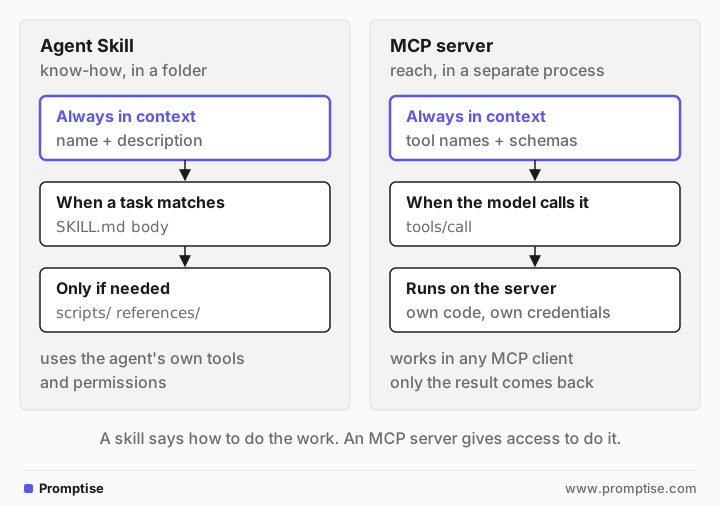
A skill is instructions plus files. It is a folder with a SKILL.md file. The model sees only its name and description until a task matches, then reads the rest.
An MCP tool is a function in another process. The model sees its name, description and schema, calls it, and gets back only the result.
Skills add no new permissions. A skill can only use tools the agent already has. An MCP server brings its own code and credentials, and so its own security boundary.
Skills need a runtime that can read them. Claude's products, OpenAI's Responses API and many coding agents support them natively. Any other agent needs a small loader, shown below.
The two now meet. An official MCP extension lets servers publish skills, though SDK support is still being built.
[02]
What are Agent Skills?
Agent Skills are an open format, originally developed by Anthropic, for packaging instructions and resources that an agent loads when a task needs them. A skill is a directory with a SKILL.md file, and optionally scripts/, references/ and assets/ folders. The specification requires two frontmatter fields:
name: 1 to 64 characters, lowercase letters, numbers and single hyphens, matching the folder name.
description: 1 to 1,024 characters, saying what the skill does and when to use it.
Optional fields are license, compatibility, metadata and an experimental allowed-tools. Here is a complete skill:
---
name: payment-reminders
description: Writes payment reminders for overdue invoices in Acme's house style. Use when the user asks to chase, remind or follow up on unpaid or overdue invoices.
---

# Payment reminders

1. Call `list_overdue_invoices` to get the facts. Never guess amounts or dates.
2. Skip any invoice less than 7 days overdue.
3. Write one reminder per customer, at most 80 words:
   - Subject: `Invoice <id>: <amount> USD overdue`
   - Polite and direct. No threats, no late fees unless the user asks.
   - End with the payment link `https://pay.acme.example/<id>`.
4. Do not send anything. Show the drafts and ask the user to approve them.
The spec's reference validator, skills-ref, accepts it:
Valid skill: skills/payment-remindersSkills load in three stages, which the spec calls progressive disclosure. The name and description (about 100 tokens) are loaded at startup for every skill. The body, recommended under 5,000 tokens, is loaded when the skill is activated. Files in the folder are read or run only when the instructions point to them.
Support is broad. Anthropic's Agent Skills docs list the Claude API, Claude Code and claude.ai, and OpenAI's Responses API supports skills "compatible with the open Agent Skills standard" through its shell tool. The spec site keeps a client showcase of other agent products that read SKILL.md folders.
[03]
What are MCP tools?
The Model Context Protocol (MCP) connects AI applications to servers that offer tools, resources and prompts. A tool is a function on the server with a name, a description and a JSON schema for its arguments. The client lists the tools, the model picks one, and the client sends tools/call; the server runs the code and returns a result.
The spec describes tools as model-controlled, resources as application-driven and prompts as user-controlled. That last point matters here: an MCP prompt is a template a user picks, for example from a slash menu. A skill is picked by the model. They can carry the same text, but they are triggered differently.
The server runs in its own process, locally over stdio or remotely over HTTP, with its own dependencies and credentials. Any MCP client can use it: Claude, ChatGPT, VS Code, Cursor and agent frameworks.
[04]
How do Agent Skills and MCP tools differ?
Agent Skill | MCP tool | |
|---|---|---|
What it is | A folder: SKILL.md plus optional scripts and files | A function on an MCP server |
What it gives the agent | Know-how: steps, rules, examples, scripts | Access: data and actions in another system |
Format | Markdown with YAML frontmatter | JSON-RPC protocol; servers in any language |
Always in context | Name and description, about 100 tokens per skill | Name, description and input schema of every tool |
Loaded later | Body when activated, files when needed | Nothing; the result arrives after a call |
Who triggers it | The model, from the description | The model, by calling the tool |
Where code runs | In the agent's environment, if the skill has scripts | On the server |
Credentials | None of its own; uses what the agent has | Its own, held by the server |
Needs | A runtime with a filesystem or a skill loader; code execution for scripts | An MCP client |
Portability | Any skills-compatible agent | Any MCP client |
Versioning | Files in git | Server deployments |
Main risk | Instructions or scripts that steer the agent's existing tools | A server with too much access, or tool results with injected text |
Two rows deserve a closer look.
Context cost. Every MCP tool's schema sits in the context on every turn, which is why too many MCP tools hurts tool choice. A skill costs one line until it is used. So long procedures and reference material belong in skills, not in tool descriptions.
Security boundary. A skill adds no permissions, but it can direct every tool the agent already has, including a shell. Anthropic's docs say to use skills only from trusted sources and to audit them like software. An MCP server is a boundary you can enforce: it holds the credential, it decides what a tool can do, and it can require approval for writes no matter what the model was told.
[05]
When to use an Agent Skill
A repeatable procedure: a release checklist, a code review process, a report format.
House rules the model keeps getting wrong: tone, naming, which template to use.
Reference material too long for the system prompt: a schema, a style guide, an API's quirks.
A deterministic script beats generated code: fill a PDF form, validate a file. The script runs and only its output enters the context.
No new access is needed. The agent already has the tools; it needs to use them well.
[06]
When to use an MCP server
The agent needs a system it can't reach: a database, a SaaS API, an internal service.
A credential must stay out of the agent. The server holds it; the model never sees it.
Several clients need the same capability: your agents, your IDE, your colleagues' assistants.
You need enforcement, not instructions: approval for writes, rate limits, audit logs, per-user permissions.
The data changes. A tool returns live results; a skill is text written last week.
And when to use neither: a one-off instruction belongs in the prompt, and a function only one agent uses can be a local tool.
[07]
How to use Agent Skills and MCP tools together
The common pattern is a skill that names the MCP tools and says how to use them. The skill above does exactly that: it tells the model to call list_overdue_invoices, which lives on an MCP server, and then how to write the reminders. Here is that server:
"""An MCP server: the reach. It knows Acme's invoices; it knows nothing about tone."""
from promptise.mcp.server import MCPServer

server = MCPServer(name="billing")

INVOICES = [
    {"id": "INV-101", "customer": "Northwind Traders", "amount": 1200.0, "days_overdue": 21},
    {"id": "INV-107", "customer": "Globex", "amount": 310.0, "days_overdue": 3},
]


@server.tool(read_only_hint=True)
async def list_overdue_invoices() -> list[dict]:
    """List overdue invoices with customer, amount in USD and days overdue."""
    return INVOICES


if __name__ == "__main__":
    server.run(transport="stdio")
Claude Code, claude.ai and other skills-compatible agents would read the skills/ folder themselves. A general agent framework needs a loader. The idea is small: put each skill's name and description into the system prompt, and give the model a tool that returns a skill's body. This is a minimal one for any Python agent:
"""Agent Skills for any agent: names in the prompt, the body loaded on demand."""
from pathlib import Path

import yaml

from promptise import ToolError, tool

SKILLS_DIR = Path(__file__).parent / "skills"


def read_skill(path: Path) -> tuple[dict, str]:
    """Split a SKILL.md into its YAML frontmatter and its Markdown body."""
    _, front, body = path.read_text().split("---", 2)
    return yaml.safe_load(front), body.strip()


def skills_index() -> str:
    """Level 1: one line per skill, for the system prompt (~100 tokens each)."""
    lines = []
    for path in sorted(SKILLS_DIR.glob("*/SKILL.md")):
        meta, _ = read_skill(path)
        lines.append(f"- {meta['name']}: {meta['description']}")
    return "\n".join(lines)


@tool
def load_skill(name: str) -> str:
    """Load the full instructions of a skill listed in your system prompt."""
    path = SKILLS_DIR / name / "SKILL.md"
    if not path.is_file():
        raise ToolError(f"No skill named {name!r}.")
    return read_skill(path)[1]  # Level 2: the body enters the context only now
Before the agent runs, check what the model will see at each level:
"""What the model sees: level 1 always, level 2 only after load_skill."""
from skills_loader import load_skill, skills_index

print("# level 1, in the system prompt:")
print(skills_index())
print("\n# level 2, what load_skill returns (first lines):")
print("\n".join(load_skill("payment-reminders").splitlines()[:4]))# level 1, in the system prompt:
- payment-reminders: Writes payment reminders for overdue invoices in Acme's house style. Use when the user asks to chase, remind or follow up on unpaid or overdue invoices.
# level 2, what load_skill returns (first lines):
# Payment reminders
1. Call `list_overdue_invoices` to get the facts. Never guess amounts or dates.
2. Skip any invoice less than 7 days overdue.The agent gets both: the billing server's tools over MCP, and the skill loader as a local tool.
"""One agent, both: MCP tools for reach, a skill for the procedure."""
import asyncio
import sys

from dotenv import load_dotenv

from promptise import StdioServerSpec, build_agent
from skills_loader import load_skill, skills_index

load_dotenv("/Users/rubenmanser/Documents/Development/AgentMCP/.env")  # OPENAI_API_KEY

INSTRUCTIONS = f"""You help Acme's finance team.
Skills you can load with load_skill when a task matches:
{skills_index()}"""


async def main() -> None:
    agent = await build_agent(
        model="openai:gpt-5-mini",
        instructions=INSTRUCTIONS,
        servers={"billing": StdioServerSpec(command=sys.executable, args=["billing_server.py"])},
        extra_tools=[load_skill],
    )
    result = await agent.ainvoke({"messages": [{"role": "user", "content": "Chase our overdue invoices."}]})
    for message in result["messages"]:
        for call in getattr(message, "tool_calls", None) or []:
            print("tool call:", call["name"], call["args"])
    print("answer:", result["messages"][-1].content)
    await agent.shutdown()


asyncio.run(main())tool call: load_skill {'name': 'payment-reminders'}
tool call: list_overdue_invoices {}
answer: Draft reminder (for approval)
Subject: Invoice INV-101: 1200.00 USD overdue
Body:
Hi Northwind Traders,
Our invoice INV-101 for 1200.00 USD is 21 days overdue. Please arrange payment at your earliest convenience: https://pay.acme.example/INV-101
Thank you,
Acme Finance
Notes:
- INV-107 (Globex, 310.00 USD) was skipped because it is only 3 days overdue (policy: skip <7 days).
- I will not send anything until you approve these drafts. Approve, edit, or tell me to send.The model loaded the skill first, because the request matched its description, then called the MCP tool, then followed the skill's rules: one reminder, the subject format, the payment link, Globex skipped as only 3 days overdue, and nothing sent. None of those rules is in the server or the system prompt. The skill's body entered the context only when it was needed.
This loader is deliberately minimal. It doesn't run scripts or read files from references/. For that, give the agent a sandboxed file-read and code-execution tool scoped to the skill folder; code execution sandboxes cover how. The spec's skills-ref to-prompt command generates the skill list as an <available_skills> XML block, if you prefer that format.
[08]
Skills over MCP: the official extension
Skills and MCP now meet in the protocol. SEP-2640, the Skills extension (io.modelcontextprotocol/skills), is final. A server that supports it implements skills/list and skills/get, and serves the skill files as MCP resources. The point is to keep a service's workflow instructions with the service: the team that owns the billing server also publishes how to use it.
Support is early. The extension's implementations list shows the official Python, TypeScript, Go and C# SDKs as in progress, with a few servers and hosts at full or partial support, including MCP Inspector since 2.6.0. Check your client before you rely on it.
[09]
Agent Skills vs MCP vs Promptise: where does Promptise fit?
Promptise Foundry, which we make, is an agent framework and an MCP server framework. It sits firmly on the MCP side of this comparison.
Promptise Foundry 1.6.0 has no Agent Skills support. It doesn't read SKILL.md folders, and it doesn't implement the MCP Skills extension. It has a class called SkillRegistry, but that is a different thing: it registers reasoning-graph nodes from Python files and activates them by file path patterns, for its own PromptGraph engine. It is not the Agent Skills format.
What it does offer on this topic:
MCP tools, both sides. build_agent(servers=...) connects an agent to any MCP server, and MCPServer builds servers with auth, rate limits and approval gates.
Local tools. @tool turns a Python function into a tool, which is how the skill loader above plugs in. That loader is the honest answer for using skills with Promptise today.
Prompts and resources. A Foundry MCP server can serve instructions as MCP prompts or resources, and an agent can receive them as tools with expose_prompts=True or expose_resources=True. That carries the same text, but without the skill format's model-picked, progressive loading.
Agent Skills runtime (Claude Code, Claude API, OpenAI Responses) | MCP | Promptise Foundry 1.6.0 | |
|---|---|---|---|
Reads SKILL.md folders | Yes | Via the Skills extension (early) | No; use a loader like the one above |
Runs skill scripts | Yes, in its code environment | No | Only through your own sandboxed tool |
Serves tools to many clients | No | Yes | Yes, with MCPServer |
Credentials outside the agent | No | Yes | Yes, on the MCP server |
Server-side approval for writes | No | Left to the server | Yes, approval gates |
If skills are central to your design, a runtime that supports them natively saves you the loader and the script sandbox. Use Promptise for the MCP servers those skills call, or for agents where MCP tools carry most of the work.
[10]
Common mistakes
Mistake | Why it fails | Fix |
|---|---|---|
Putting a long procedure into an MCP tool description | The text sits in context on every turn, for every task | Move it to a skill; keep the tool description short |
Writing a skill to "access" a system | A skill can't add access; the agent still lacks the credential | Build or install an MCP server |
A vague skill description ("Helps with invoices") | The model never activates it | Say what it does and when to use it, with trigger words |
Installing skills from unknown sources | A skill can steer every tool the agent has | Audit skills like code; prefer your own |
Duplicating the same rules in a skill and an MCP prompt | They drift apart | Keep one source; serve it through the Skills extension when your clients support it |
Expecting MCP prompts to trigger on their own | Prompts are user-controlled | Use a skill, or put the rule in the tool description |
[11]
Limitations
Skills depend on the runtime. Native support needs a filesystem, and scripts need code execution. On the Claude API, skills run in a container without network access.
Skills are not enforcement. "Never send without approval" in a skill is an instruction the model can ignore. If it matters, enforce it in the tool or the server.
Custom skills don't sync across products. Anthropic's docs say skills uploaded to claude.ai, the API and Claude Code are managed separately.
The Skills extension for MCP is new, and SDK support is still in progress.
The loader in this guide is minimal: no scripts, no reference files, no caching.
[12]
FAQ
What is the difference between Agent Skills and MCP?
Agent Skills package know-how: instructions, reference files and scripts in a folder with a SKILL.md file, loaded when a task matches. MCP connects an agent to tools and data on a separate server, with its own credentials. A skill tells the agent how to do something; an MCP server gives it access to do it.
Do Agent Skills replace MCP?
No. A skill can only use tools the agent already has, so it can't give an agent access to a database or an API. Skills reduce how much instruction text you put into tool descriptions and prompts, and they work best alongside MCP servers.
Are Agent Skills cheaper in tokens than MCP tools?
Usually, for instructions. A skill costs about 100 tokens for its name and description until it is used, while every MCP tool's schema is in the context on every turn. For access to live data, there is no skill equivalent, so the comparison doesn't apply.
Can an MCP server provide Agent Skills?
Yes, through the official Skills extension (SEP-2640), which is final. A server lists skills with skills/list and serves their files as resources. SDK and client support is still in progress, so check your client first.
Can I use Agent Skills with any AI agent?
Yes, with a loader. Put each skill's name and description in the system prompt and give the model a tool that returns a skill's body, as in this guide. Running a skill's scripts also needs a sandboxed code execution tool.
Does Promptise support Agent Skills?
Not natively. Promptise Foundry 1.6.0 doesn't read SKILL.md folders or implement the MCP Skills extension; its SkillRegistry is a different feature for its reasoning-graph engine. You can load skills with a small @tool loader, as shown above, and use Promptise for the MCP tools.
[13]
Next steps
What is the Model Context Protocol covers MCP from the start.
MCP tools vs resources vs prompts explains the three MCP primitives in depth.
MCP vs CLI for AI agents compares MCP with shell commands, another way skills often reach systems.
Context engineering for AI agents covers what goes into the context and when.
Build a production MCP server in Python shows the server side.